Introduction to Computer Vision
Imagine a world where computers can recognize faces, identify objects, read signs, detect diseases, and even help cars drive without human control. These technologies may sound like something from a science fiction movie, but they are already part of our everyday lives. The technology behind many of these innovations is known as Computer Vision.
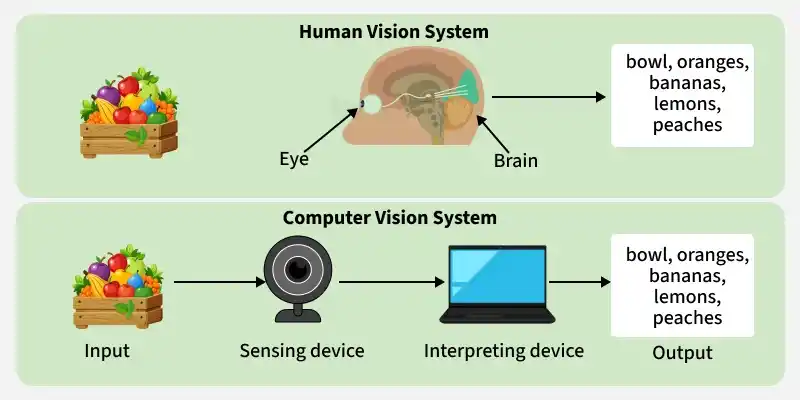
Computer Vision is a field of artificial intelligence (AI) that enables computers and machines to interpret and understand visual information from the world around them. This information can come from images, videos, cameras, medical scans, or other visual sources. Instead of simply capturing a picture, a computer vision system analyzes the visual details and uses them to identify objects, recognize patterns, and make useful decisions.
From smartphone cameras to advanced medical equipment, computer vision is changing how people interact with technology. As computing power increases and artificial intelligence continues to develop, this technology is becoming more accurate, accessible, and valuable across different industries.
What Is Computer Vision?
Computer Vision is the process of teaching computers to extract meaningful information from visual data. Human beings naturally recognize faces, understand scenes, and notice movement without consciously analyzing every detail. Computers, however, need specialized algorithms and trained models to perform similar tasks.
For example, when a person looks at a photograph of a dog, they can immediately recognize the animal. A computer vision system must process the image, identify important visual patterns, and compare them with patterns learned during training.
Depending on its purpose, a computer vision system may recognize objects, classify images, track movement, measure distances, or detect unusual activities. Some systems can also interpret complex scenes containing several objects and relationships.
The primary goal is not simply to make computers see images but to help them understand what those images represent.
How Does Computer Vision Work?
Computer Vision combines several technologies, including image processing, machine learning, deep learning, and neural networks. Although the exact process varies between applications, most systems follow a few common steps.
1. Image Acquisition
The first step is collecting visual information. This information may come from a digital camera, smartphone, security camera, satellite, microscope, or medical imaging device. The quality of the captured data can influence how accurately the system performs.
For example, a security camera with poor lighting may produce images that are difficult to analyze.
2. Image Processing
After collecting an image, the system may improve its quality by adjusting brightness, reducing noise, resizing the image, or enhancing important details. These operations help prepare the visual data for further analysis.
Not every computer vision application requires extensive image processing, but preparing the data can improve performance in many situations.
3. Feature Extraction
The system identifies useful patterns within the image. These patterns may include edges, shapes, textures, colors, and more complex visual features.
Traditional computer vision methods often rely on manually designed features. Modern deep learning systems can learn many useful features directly from training images.
4. Model Training
Machine learning models learn from examples. A model designed to recognize cats, for instance, can be trained using thousands of labeled images containing cats and other animals.
During training, the model adjusts its internal parameters to improve its predictions. The quality and variety of the training data play an important role in determining how well the model performs.
5. Prediction and Decision-Making
Once trained, the model can analyze new images and produce results. It might identify a vehicle, locate a damaged product, recognize a face, or highlight a suspicious area in a medical scan.
The final result depends on the model, the available data, and the task it was designed to perform.
Major Applications of Computer Vision
Computer Vision has become an important technology in many industries. Its ability to analyze visual information quickly makes it useful for tasks that would otherwise require considerable human effort.
Healthcare and Medical Imaging
Healthcare is one of the most promising areas for computer vision. Medical professionals use imaging technologies such as X-rays, CT scans, MRIs, and retinal photographs to examine the human body.
Computer vision systems can help identify patterns associated with certain diseases, highlight suspicious areas, and support doctors when reviewing medical images. For example, an AI system may flag a possible abnormality in a chest X-ray for further examination.
These tools can help medical professionals work more efficiently, but they do not eliminate the need for qualified doctors. Their results must be interpreted carefully, particularly when decisions affect a patient’s health.
Self-Driving Cars and Transportation
Autonomous vehicles rely on visual information to understand their surroundings. Cameras can help these vehicles identify pedestrians, traffic lights, road signs, other vehicles, and lane markings.
Computer vision allows a vehicle’s software to interpret these visual signals and provide information for driving decisions. For example, recognizing a pedestrian near a crossing can help the vehicle’s control system respond appropriately.
Reliable autonomous driving requires more than computer vision alone. It may also involve radar, lidar, GPS, detailed maps, and other technologies to improve environmental awareness and safety.
Retail and E-Commerce
Online shopping platforms and physical stores are also benefiting from computer vision. Retailers can use visual recognition to identify products, monitor stock levels, and improve inventory management.
Visual search is another useful application. Instead of typing a product name, customers can upload a photograph and search for visually similar items.
In physical stores, computer vision may also help analyze customer movement and identify empty shelves. When implemented responsibly, these systems can improve shopping experiences and reduce manual work.
Security and Surveillance
Security systems can use computer vision to detect movement, identify objects, and recognize unusual activity. For example, a system may alert security personnel when someone enters a restricted area or when an unattended object appears in a monitored location.
Some systems also use facial recognition to compare a person’s face with stored images. However, facial recognition raises important concerns involving privacy, accuracy, consent, and potential misuse.
Organizations should establish clear rules for collecting and processing visual data. Human oversight is particularly important when surveillance results could affect someone’s rights or access to services.
Manufacturing and Quality Control
Manufacturing companies use computer vision to inspect products during production. Cameras can capture images of items moving along an assembly line, while trained models analyze those images for defects.
A system might identify cracks in a component, incorrect packaging, missing parts, or inconsistent product dimensions.
Automated inspection can help manufacturers identify problems earlier and reduce waste. It can also improve consistency when large numbers of products need to be checked within a short period.
Agriculture and Farming
Agriculture is another field where computer vision offers practical benefits. Farmers can use cameras mounted on drones, tractors, or other equipment to monitor crops and identify potential problems.
Image analysis can help detect weed growth, recognize signs of plant disease, estimate crop development, and assess differences between areas of a field.
When combined with weather information and other agricultural data, computer vision can support more informed decisions about irrigation, spraying, and crop management. This can help farmers use resources more efficiently.
The Role of Artificial Intelligence and Deep Learning
Artificial intelligence provides the broader framework that allows machines to perform tasks associated with human intelligence. Computer Vision is one of its important applications, while machine learning and deep learning provide many of the methods used to interpret visual data.
Deep learning uses artificial neural networks containing multiple processing layers. These networks can learn complex visual patterns from large collections of images.
Convolutional neural networks, commonly known as CNNs, have played an important role in image classification and object recognition. More recently, vision transformers and other advanced architectures have expanded the range of techniques available for visual understanding.
Modern systems can perform tasks such as object detection, image segmentation, facial analysis, and image generation. Some models can even connect visual information with natural language, allowing users to ask questions about images.
Despite these advances, AI models do not understand the world exactly as humans do. Their predictions depend on training data, learned patterns, and the conditions in which they are used.
Benefits of Computer Vision
Computer vision offers several advantages when it is designed and implemented correctly.
Greater efficiency: Computers can analyze large numbers of images much faster than people can inspect them manually.
Improved consistency: Automated systems can apply the same inspection criteria repeatedly, reducing some forms of human error.
Better decision support: Visual analysis can reveal patterns that help professionals make more informed decisions.
Reduced operational costs: In suitable applications, automation can reduce repetitive work and identify problems before they become expensive.
Real-time monitoring: Some computer vision systems can analyze video streams continuously and generate alerts when specific events occur.
However, these benefits depend on the quality of the system, the complexity of the task, and the environment in which it operates.
Challenges and Limitations of Computer Vision
Although computer vision has made significant progress, several challenges remain.
One major issue is data quality. Images captured in poor lighting, heavy rain, unusual angles, or crowded environments may be difficult to interpret accurately. A model trained mainly on clear images might struggle when conditions change.
Another challenge is bias. If training data does not adequately represent different people, environments, or object types, a system may perform better for some groups or situations than others. Careful data collection and evaluation are essential for identifying these problems.
Privacy is also an important concern. Cameras and facial recognition technologies can collect sensitive information, sometimes without people’s full awareness. Responsible use requires appropriate security measures, transparency, and compliance with relevant laws.
Finally, developing reliable systems can be expensive. Organizations may need specialized hardware, large datasets, technical expertise, and ongoing maintenance. Models must also be tested regularly because changes in real-world conditions can reduce their accuracy over time.
The Future of Computer Vision
The future of computer vision is closely connected to advances in artificial intelligence, robotics, edge computing, and automation. As models become more capable, they are likely to support an expanding range of tasks in homes, workplaces, hospitals, factories, and public spaces.
One important development is the use of vision systems directly on devices such as smartphones, cameras, and industrial sensors. Processing images locally can reduce delays and limit the amount of visual data that needs to be transferred to external servers.
Another promising direction involves multimodal AI systems that combine images, text, audio, and other information. These systems may help robots understand instructions, assist people with visual impairments, and provide more detailed explanations of complex images.
Nevertheless, future progress will require more than improving accuracy. Developers must also address security, fairness, privacy, transparency, and the responsible use of automated decisions.
Speech Recognition: Technology, Benefits, Uses, and Future
Introduction
Speech recognition is a modern technology that allows computers and digital devices to understand spoken words. It converts human speech into text or commands that machines can process. This technology has become an important part of everyday life, from mobile phone assistants to automated customer service systems. It helps people interact with technology in a faster and more convenient way. As technology continues to develop, speech recognition is becoming more accurate, useful, and accessible.
1. What Is Speech Recognition?
Speech recognition is a technology that enables computers to identify and interpret spoken language. It analyzes sounds produced by a speaker and converts them into meaningful words or instructions. This process allows users to communicate with devices without typing on a keyboard. For example, a person can dictate a message, search for information, or open an application by speaking. Speech recognition systems use specialized software and language models to understand what people say. Their main purpose is to make communication between humans and machines easier.
2. How Does Speech Recognition Work?
Speech recognition works through several connected steps that help a computer process spoken language. First, a microphone captures the speaker’s voice and converts sound waves into digital data. The system then analyzes the audio to identify different speech patterns and sound units. These patterns are compared with information learned during training. Advanced systems use artificial intelligence and machine learning to recognize words more accurately. The software considers language structure and context to determine the most likely sentence. Finally, the recognized speech is converted into text or used to perform a requested action.
3. Importance of Speech Recognition
Speech recognition has become important because it provides a convenient way to interact with digital technology. People can perform many tasks by speaking instead of entering information manually. This can save time and improve productivity in homes, offices, schools, and other environments. It is particularly helpful when typing is difficult or when users need hands-free access to a device. Businesses can also use this technology to manage calls and process spoken information. By reducing some communication barriers, speech recognition makes digital services more accessible to a wider range of people.
4. Applications of Speech Recognition
Speech recognition is used in many industries and everyday activities. Smartphones use it for voice searches, reminders, messaging, and virtual assistants. Hospitals may use speech-to-text systems to help healthcare professionals prepare notes and documentation. Educational platforms can provide captions or convert spoken lessons into written material. In offices, employees can dictate reports, emails, and meeting notes. Customer support services may use voice recognition systems to direct callers to the appropriate department. These applications demonstrate how speech recognition can simplify tasks and support more efficient communication.
5. Speech Recognition in Artificial Intelligence
Artificial intelligence plays a major role in modern speech recognition systems. AI-based models can learn from large collections of recorded speech and written language. This training helps them recognize different words, accents, and speaking styles. Some advanced systems also use contextual information to distinguish between words that sound similar. As these systems improve, they can handle more natural conversations and complex instructions. However, their performance still depends on training quality, audio clarity, and language coverage. Combining speech recognition with AI continues to expand the possibilities of voice-based technology.
6. Benefits of Speech Recognition
One of the main benefits of speech recognition is that it allows users to complete tasks without relying entirely on manual typing. It can increase efficiency when creating documents, searching for information, or entering notes. The technology can also support people who have limited mobility or difficulty using traditional input devices. In suitable environments, voice commands make digital tools easier to operate while a person’s hands are occupied. Businesses may benefit from faster documentation and improved customer interactions. Although the results vary by application, speech recognition can make many routine activities more convenient.
7. Speech Recognition in Education
Speech recognition offers useful opportunities for students, teachers, and educational institutions. Students can dictate assignments and use speech-to-text tools to organize their ideas. Teachers may use transcription software to prepare lesson notes or generate written records of discussions. Captions can help learners follow spoken content in videos and online classes. Language learners may also practice pronunciation with applications that provide speech-related feedback. These tools can support different learning needs and study preferences. However, students should review automatically generated text because recognition errors may affect the accuracy of their work.
8. Speech Recognition in Healthcare
Healthcare organizations can use speech recognition to make certain administrative tasks more efficient. Medical professionals may dictate clinical notes, patient histories, and other documentation instead of typing every word. Transcription systems can help convert spoken information into searchable text for review. Some accessibility tools also allow patients to interact with digital services through voice commands. Nevertheless, medical information requires a high level of accuracy and confidentiality. Recognized text must be checked carefully, particularly when it includes medication names, diagnoses, or treatment instructions. Speech recognition can support healthcare workers, but it should not replace professional judgment or appropriate verification.
9. Challenges of Speech Recognition
Despite its advantages, speech recognition faces several technical challenges. Background noise can make it difficult for a system to identify spoken words correctly. Different accents, speech speeds, and pronunciation styles may also affect performance. Some systems struggle with uncommon names, specialized vocabulary, or languages with limited training data. Similar-sounding words can create errors when the surrounding sentence is unclear. Privacy is another concern because voice recordings may contain sensitive personal information. Developers continue to improve recognition models, but users should understand that these systems are not always completely accurate.
10. Speech Recognition and Voice Assistants
Voice assistants are among the most familiar examples of speech recognition technology. They allow users to ask questions, set alarms, play music, check information, and control compatible devices. When a person gives a voice command, the system processes the request and determines what action may be needed. Some assistants also use natural language processing to interpret the meaning behind spoken instructions. Their usefulness depends on how well they recognize speech and understand the user’s intention. These tools can make everyday tasks more convenient, although they may misunderstand commands in noisy surroundings or unfamiliar speaking styles.
11. Speech Recognition and Accessibility
Speech recognition can make digital technology easier to use for people with different accessibility needs. Individuals who find typing challenging may use voice input to write messages, search websites, or control compatible software. Live transcription can help people follow conversations, presentations, and recorded content. Voice commands may also reduce the need for repeated physical interaction with a device. These features can support greater independence in education, employment, and daily life. However, accessibility tools should offer alternatives for users whose speech is not recognized reliably. Inclusive design is essential to ensure that the benefits reach people with diverse communication needs.
12. The Future of Speech Recognition
The future of speech recognition is likely to involve more natural, responsive, and context-aware interactions. Improvements in artificial intelligence may help systems understand conversational speech and handle a broader range of accents and languages. Real-time transcription and multilingual communication tools may also become more useful in workplaces and educational settings. Researchers are working to reduce recognition errors and improve performance in noisy environments. At the same time, developers must address privacy, data security, and responsible use. Continued progress could make speech recognition an even more valuable part of everyday digital experiences.
Conclusion
Speech recognition has changed how people communicate with computers and digital devices. It offers practical benefits in education, healthcare, business, accessibility, and daily activities. Although challenges such as background noise, language differences, and privacy remain, technological improvements continue to make these systems more capable. Users should still check important information produced by automated speech tools. With responsible development and thoughtful use, speech recognition can support more convenient, efficient, and inclusive communication.
Frequently Asked Questions (FAQs)
1. What is speech recognition used for?
Speech recognition is used to convert spoken language into text or commands. Common examples include voice assistants, dictation software, automatic captions, voice searches, and customer service systems.
2. What are the main benefits of speech recognition?
The main benefits include faster text entry, hands-free interaction, improved accessibility, and more convenient communication with digital devices. Its effectiveness depends on the system and the conditions in which it is used.
3. What are the common challenges of speech recognition?
Common challenges include background noise, different accents, unclear pronunciation, specialized vocabulary, and privacy concerns. Some systems may also struggle with less widely supported languages or complex speech patterns.
Conclusion
Computer Vision is transforming the way machines interact with the visual world. By combining image processing, machine learning, and deep learning, it enables computers to recognize objects, analyze scenes, and extract valuable information from images and videos.
Its applications extend across healthcare, transportation, retail, manufacturing, agriculture, and security. These technologies can improve efficiency, support decision-making, and help solve problems that were once difficult to automate.
At the same time, computer vision has limitations involving data quality, bias, privacy, cost, and reliability. Addressing these challenges is essential for building systems that people can trust.
As artificial intelligence continues to advance, computer vision will likely become an even more important part of everyday technology. Understanding how it works, where it is useful, and what its limitations are can help individuals and organizations make better use of this rapidly developing field.